Amazon SageMaker AI 多轮强化学习动手指南
Multi-Turn Reinforcement Learning on Amazon SageMaker AI: A hands-on guide
AWS 官方博客发布在 Amazon SageMaker AI 上实践多轮强化学习(MTRL)训练智能体的动手指南,以 Wordle 展示从部署到评估的端到端流程。实验将 gpt-oss-20b 在保留词上的解决率从 61% 提升至 84%,训练 token 费用约 $339。教程指出同一管道适用于公开模型未训练过的内部多步任务。
Most fine-tuning teaches a model to produce a better answer to a single prompt. Agentic tasks are different. An agent that files an expense report or triages a support ticket takes a sequence of actions, and each step depends on what came before. There’s rarely one correct sequence to imitate, and the only reliable feedback is whether the whole sequence succeeded. Supervised fine-tuning has no labels for that, and single-turn reinforcement learning cannot credit a decision made three steps before the outcome.
Multi-Turn Reinforcement Learning (MTRL) on Amazon SageMaker AI trains models on exactly that signal. SageMaker AI sends prompts to an agent you host on Amazon Bedrock AgentCore, or on your own infrastructure, such as Amazon Elastic Kubernetes Service (Amazon EKS), Amazon Elastic Compute Cloud (Amazon EC2), or AWS Fargate, through an AWS Lambda forwarder. The example here uses AgentCore. The agent calls the policy model being trained, acts in your environment over as many turns as the task needs, and reports one reward when the episode ends. You don’t specify the right trajectory, only how to score the result.
This post uses Wordle, a game in which a player has six tries to guess a hidden five-letter word, as the example. After each guess, every letter turns green if it is in the right position, yellow if it’s in the word but in a different position, and gray if it isn’t in the word. The game suits MTRL because the rules are few, each guess depends on the feedback from the last, and the outcome is scored objectively. Wordle is a teaching example, and frontier models already play it well. In practice, you would use MTRL to make a small, low-cost model good at a multi-step task specific to your business, such as an internal workflow that public models were never trained on. The same pipeline applies to that setting.
In our run, MTRL took gpt-oss-20b from a 61 to an 84 percent solve rate on held-out words at its default reasoning effort, and from 15 to 69 percent at the low effort it trained at, for about $339 in training tokens. In this post, we walk through the pipeline end-to-end: deploying the agent and reward to AgentCore, preparing the dataset, training, monitoring in MLflow, and evaluating at serving settings. We also share the reward-design mistakes and training failures we hit. Your datasets, agent, and trained model stay in your AWS account and are not used to train the base models. All code is in the accompanying aws-samples repository.
Solution overview
The system has two halves. SageMaker AI owns the training job and the policy model. AgentCore hosts the agent, the Wordle environment, and the reward function. The following diagram shows how they connect.
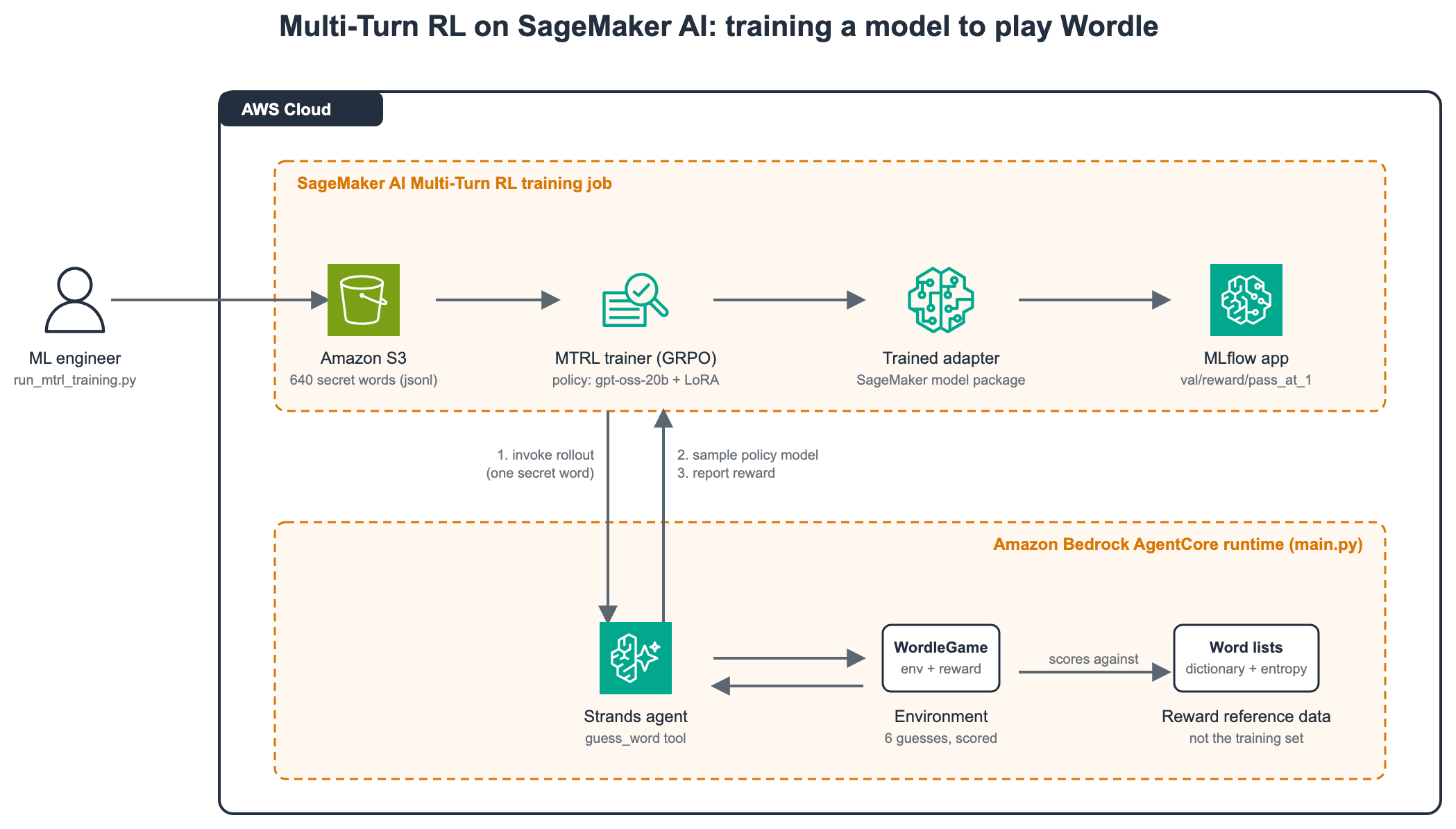
Figure 1: MTRL on SageMaker AI, where the training job invokes the AgentCore-hosted agent once per rollout to sample the policy model, play the game, and report a reward
For every rollout, the MTRL service invokes the AgentCore runtime, a capability of Amazon Bedrock AgentCore, with one training row, which holds one secret word. A Strands agent in the runtime calls the policy model through the SageMaker Job Runtime’s OpenAI-compatible endpoint. The model plays up to six guesses through one tool, guess_word, and after each guess the environment returns per-letter feedback and a summary of what is known. When the game ends, the agent returns one reward. Group Relative Policy Optimization (GRPO) uses the spread of rewards across several rollouts of the same word to update a Low-Rank Adaptation (LoRA) adapter on the policy model.
Three design points matter for what follows:
- The agent and reward live in one place. A single Python file deployed to AgentCore holds the environment, the tool, and the scoring function.
- The dataset carries only the secret word. The word lists bundled with the agent are built from the open-source SCOWL word lists and are used only for scoring.
- The reward is outcome-dominant. A solve pays 1.05–1.55 depending on speed, a loss pays -0.5, and never making a valid guess pays -1.5. A small shaping term rewards good strategy within each tier.
Supported models and AWS Regions
MTRL is serverless: you pick a base model and the service provisions the training and sampling infrastructure. At the time of writing, it supports the following base models, each trained with a LoRA adapter:
| Base model | AWS Regions |
| Amazon Nova 2 Lite | US East (N. Virginia) (us-east-1), US West (Oregon) (us-west-2) |
GPT-OSS-20B |
US East (N. Virginia) (us-east-1), US West (Oregon) (us-west-2) |
| Gemma 4 31B (instruction-tuned) | US West (Oregon) (us-west-2) |
| Qwen 3.6 27B | US West (Oregon) (us-west-2) |
We chose GPT-OSS-20B because it has the lowest per-token price of the four and its reasoning effort is controllable per request. See the MTRL documentation for the current list.
Pricing
You don’t choose instances or size a cluster. You pay per million tokens in three dimensions, priced by base model:
- Prefill: input tokens the policy model processes. These accumulate in a multi-turn task, because every turn re-reads the history.
- Sample: tokens the policy model generates, including reasoning tokens.
- Train: tokens processed in the backward pass that updates the LoRA adapter.
The 100-step run consumed 491.6 million prefill, 159.7 million sample, and 643.3 million train tokens across 105,486 rollouts in 12 hours 40 minutes. At GPT-OSS-20B list prices in the US East (N. Virginia) Region (us-east-1) at the time of writing, that is about $339:
| Dimension | Tokens | Price per 1M | Cost |
| Prefill | 491,616,806 | $0.12 | $58.99 |
| Sample | 159,737,098 | $0.30 | $47.92 |
| Train | 643,308,554 | $0.36 | $231.59 |
| Total | 1,294,662,458 | $338.50 |
The train dimension dominates and scales with trajectory length, so shorter games and less verbose reasoning cut the bill. The AgentCore runtime bills separately for the vCPU and memory the agent uses. For this run, that was about $79, from the runtime’s Amazon CloudWatch usage metrics at us-east-1 list prices. DescribeJob reports the token counts under BillableTokenUsage. See Amazon SageMaker AI pricing for current rates.
Prerequisites
To follow this walkthrough, you need the following. See also the MTRL prerequisites.
- Python 3.10 or later, uv, Node 20 or later, and the AgentCore CLI (
npm install -g @aws/agentcore). See Get started with Amazon Bedrock AgentCore for installation and the IAM permissions the CLI needs. - botocore 1.43.37 or later, on the machine that launches the job. This is the first version that includes the
AgentRFTCreateJoboperation. - Two AWS Identity and Access Management (IAM) roles, described in Step 1.
- An Amazon Simple Storage Service (Amazon S3) bucket in the same Region as the agent. The training job must also run in that Region, because
CreateJobrejects a cross-Region runtime ARN.
Step 1: Create the IAM roles
MTRL uses two roles, and one of them has a trust policy that the general SageMaker AI documentation doesn’t mention.
Agent runtime role. agentcore deploy creates this role for you. It trusts bedrock-agentcore.amazonaws.com and needs the AmazonSageMakerJobRuntimeAccess managed policy, which lets the agent call the policy model and report rewards. The CDK stack in the sample repository attaches this policy automatically.
Training job role. You create this one. It must trust job.sagemaker.amazonaws.com with both sts:AssumeRole and sts:TagSession, and it needs the AmazonSageMakerJobFullAccess managed policy.
{
    "Version": "2012-10-17",
    "Statement": [{
        "Effect": "Allow",
        "Principal": {"Service": "job.sagemaker.amazonaws.com"},
        "Action": ["sts:AssumeRole", "sts:TagSession"]
    }]
}
Note: The trust principal is job.sagemaker.amazonaws.com, not sagemaker.amazonaws.com. With the generic principal, CreateJob fails with “Could not assume role,” and the message names the correct principal only after retries.
Step 2: Deploy the agent to Amazon Bedrock AgentCore
Clone the sample repository, set your account and Region in Wordle/agentcore/aws-targets.json, and deploy:
git clone https://github.com/aws-samples/sample-multi-turn-rl-wordle
cd sample-multi-turn-rl-wordle/Wordle
agentcore validate
agentcore deploy
The CLI builds the agent’s dependencies for the runtime’s Linux ARM64 platform, creates the execution role with AmazonSageMakerJobRuntimeAccess attached, and deploys through AWS CloudFormation. We recommend it over uploading a code package on the console, where it’s common to get the roughly 700 MB of compiled dependencies or the policy attachment wrong. Note the runtime ARN in the output for the training job.

Figure 2: The Wordle agent runtime in the Amazon Bedrock AgentCore console with status Ready
The runtime reads two environment variables from agentcore.json. REASONING_EFFORT=low sets reasoning_effort on every request to the policy model. In our evaluation jobs, low effort used 63 to 83 percent fewer sample tokens per game than medium. REASONING_PROMPT_HINT=true also adds “Reasoning: low” to the system prompt, which is how gpt-oss reads the setting in its Harmony chat format. Neither variable gives the model any hint about the secret word.

Figure 3: Runtime environment variables showing REASONING_EFFORT set to low
The agent is one file, main.py. Simplified, its entrypoint looks like the following. For your own task, you change the task parsing, the tools, and the reward:
app = BedrockAgentCoreApp()

@app.entrypoint  # outermost: starts the HTTP server AgentCore invokes
@sagemaker_rft_handler  # reports the returned reward to SageMaker AI
def handle_rollout(payload):
    prompt, answer = parse_task(payload["prompt"])
    game = WordleGame(answer)

    @tool
    def guess_word(guess: str) -> str:
        """Submit a 5-letter Wordle guess and get feedback."""
        return game.guess(guess)

    agent = Agent(model=build_model(), system_prompt=SYSTEM_PROMPT, tools=[guess_word])
    agent(prompt)
    return {"reward": game.final_reward()}
Important: The sagemaker_rft_handler decorator does not start an HTTP server by itself. Wrap it with BedrockAgentCoreApp and @app.entrypoint, with the entrypoint decorator outermost. Without this, every invocation times out after 30 seconds.
Step 3: Verify the runtime
Before spending GPU time, confirm the whole chain works with a payload shaped like the one the training service sends. The repository includes one as Wordle/payload.json:
{
  "prompt": "{\"prompt\": \"Guess the 5-letter word\", \"answer\": \"beach\", \"id\": \"smoke-test\"}",
  "metadata": {
    "jobArn": "arn:aws:sagemaker:us-east-1:111122223333:job/AgentRFT/smoke-test",
    "rolloutId": "r1"
  }
}
The fake job ARN is expected to fail, and the way it fails is the proof. Put your own account ID into it first: for a job ARN in another account, the service returns a 403 before it checks whether the job exists, which looks like a broken IAM setup. From the Wordle directory, run:
ACCOUNT=$(aws sts get-caller-identity --query Account --output text)
sed "s/111122223333/$ACCOUNT/" payload.json > /tmp/payload.json

aws bedrock-agentcore invoke-agent-runtime \
  --agent-runtime-arn <RUNTIME_ARN> \
  --runtime-session-id smoke-test-$(date +%s)000000000000000 \
  --payload fileb:///tmp/payload.json /dev/stdout
In the runtime’s Amazon CloudWatch logs, you see the agent parse the prompt, authenticate to the Job Runtime endpoint, and receive a 400 error reading “Could not find job.” That failure confirms that parsing, authentication, and error reporting work. The command itself prints {“reward”: -1.5}, because the agent never reached the policy model. A 403 reading “not authorized to access this resource” means the job ARN still names another account. A 30-second timeout instead means the HTTP server is not starting (see the Important note in Step 2).
Step 4: Prepare the dataset
The MTRL dataset has no target responses, transcripts, or labels. Each row is one task for the agent to attempt. Here are the first three rows of the training file:
{"prompt": "{\"prompt\": \"Guess the 5-letter word\", \"answer\": \"riser\", \"id\": \"wordle_train_0000\"}"}
{"prompt": "{\"prompt\": \"Guess the 5-letter word\", \"answer\": \"swoon\", \"id\": \"wordle_train_0001\"}"}
{"prompt": "{\"prompt\": \"Guess the 5-letter word\", \"answer\": \"dirty\", \"id\": \"wordle_train_0002\"}"}
The service reads the prompt column (or the first column) and passes the string to your agent verbatim, without parsing it. We made the string a small JSON object with three fields:
- prompt: the instruction the agent shows the policy model, identical on every row.
- answer: the secret word. Only the environment and the reward function use it. The policy model never sees it.
- id: a row ID for tracing a rollout in the logs back to its source row.
The sample repository’s make_dataset.py draws 640 training words (five full batches of 128) and 128 validation words from the answer list with no overlap, so the validation solve rate measures generalization. The service also accepts Apache Parquet, JSON arrays, and CSV. Upload both files to Amazon S3:
uv run python make_dataset.py
aws s3 cp training-data.jsonl s3://<YOUR_BUCKET>/wordle-mtrl/train/
aws s3 cp validation-data.jsonl s3://<YOUR_BUCKET>/wordle-mtrl/validation/
Because the service never inspects the prompt string, a production task can pack a full message list, tool configuration, or reward specification into it. See the MTRL documentation for examples, including how to protect sensitive content in the string.
Step 5: Launch the training job
The launcher uses the MultiTurnRLTrainer class from the sagemaker-train SDK. Point it at the runtime ARN from Step 2, the role from Step 1, the datasets from Step 4, and an MLflow app for metrics. The MLflow app is required, so if you don’t have one, create it first with aws sagemaker create-mlflow-app:
uv run python run_mtrl_training.py \
  --model openai-reasoning-gpt-oss-20b \
  --agent-runtime-arn <RUNTIME_ARN> \
  --role-arn arn:aws:iam::<ACCOUNT>:role/<JOB_ROLE> \
  --train-dataset s3://<YOUR_BUCKET>/wordle-mtrl/train/training-data.jsonl \
  --val-dataset s3://<YOUR_BUCKET>/wordle-mtrl/validation/validation-data.jsonl \
  --s3-output-path s3://<YOUR_BUCKET>/wordle-mtrl/output/ \
  --mlflow-app-arn arn:aws:sagemaker:<REGION>:<ACCOUNT>:mlflow-app/<APP_ID>
The launcher overrides three hyperparameters and leaves every other one at the gpt-oss-20b default. It sets sampling_max_tokens to 8192, the service maximum, because at the default of 4096 gpt-oss often ran out of tokens while reasoning, before its first tool call. It sets max_epochs to 20 and max_steps to 100: 640 rows at the default global_batch_size of 128 is 5 steps per epoch, and with the default group_size of 8, each step plays 1,024 games. The job moves through Starting, Downloading, and Pending before reaching Training. After it’s training, your AgentCore runtime begins receiving rollout invocations.
Important: Don’t redeploy the agent while a job is running. Redeploying restarts the runtime, in-flight rollouts see no sampling requests, and the service fails the entire job.
Step 6: Monitor training in MLflow
The service logs reward, token, and turn statistics at every step and runs validation every val_every steps. The metric to watch is val/reward/pass_at_1, the fraction of held-out words solved. Every solve scores at least 1.01, so it clears the service’s success_threshold of 1.0 and pass@1 counts it. The following chart is built from this run’s MLflow history:
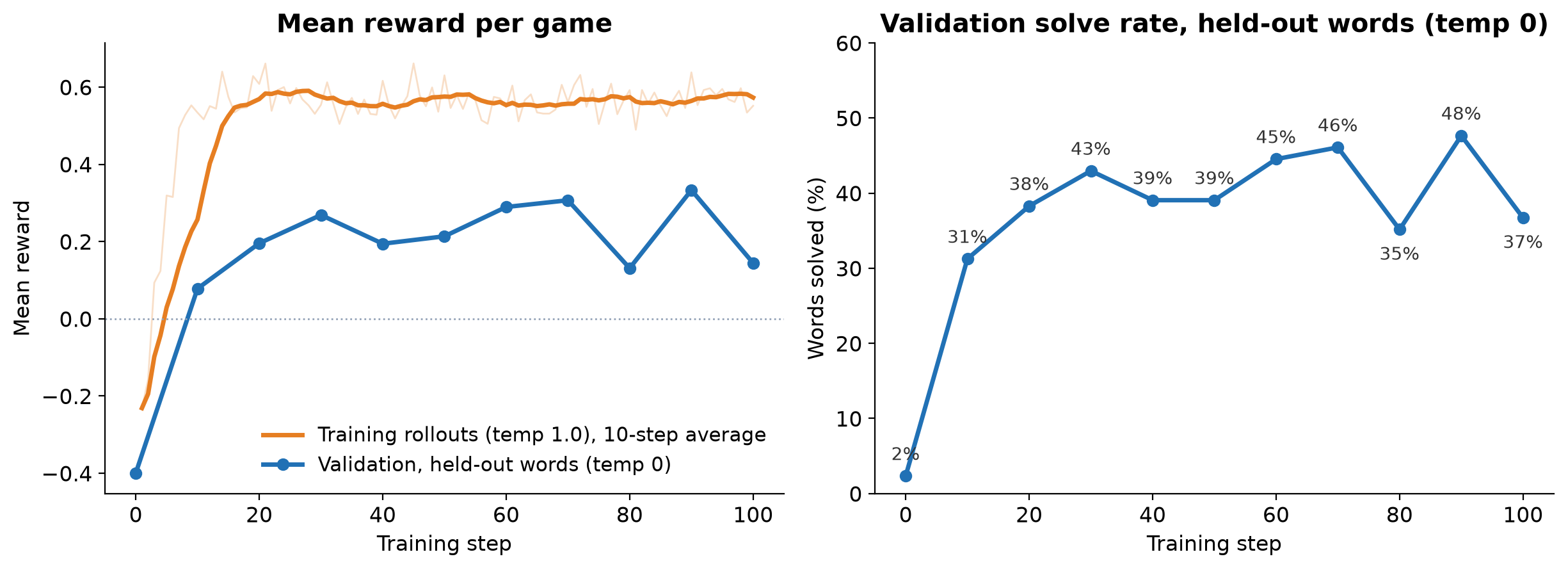
Figure 4: Training curves for the 100-step run, with mean reward per game on the left and validation solve rate on the right
Training reward climbs to about +0.57 within 15 steps and holds there. Validation reward stays lower, mostly because of temperature 1.0 versus 0 rather than overfitting (see Step 7). The validation solve rate jumps from 2 to 31 percent in the first 10 steps, then moves between 35 and 48 percent. With 128 words, those swings are mostly noise. We did not test whether more steps help at serving settings.
The runtime’s OpenTelemetry traces in CloudWatch record every model turn and tool call. Here is one game the trained model played during an evaluation job (medium effort, temperature 1.0), with the reasoning trimmed. The secret word was PASTE:
[model] Reasoning: [...] "CRANE" has 5 distinct letters: C,R,A,N,E. [...]
We'll guess "CRANE".
Tool call: guess_word(guess="CRANE")
[tool] Guess 1/6: CRANE -> C=gray, R=gray, A=yellow, N=gray, E=green
Current Knowledge:
- Correct Position (Green): _ _ _ _ E
- In Word, Wrong Position (Yellow): 'A' (at least 1)
- Not in Word (Gray): C, N, R
- Guesses Remaining: 5
[model] Reasoning: [...] "ALIVE": ends with E, includes A. Letters not C,N,R.
Tool call: guess_word(guess="ALIVE")
[tool] Guess 2/6: ALIVE -> A=yellow, L=gray, I=gray, V=gray, E=green
[model] Reasoning: [...] So positions not 1 or 3 for A. Positions left: 2,4
for A. [...] We might guess "HASTE"? [...]
Tool call: guess_word(guess="HASTE")
[tool] Guess 3/6: HASTE -> H=gray, A=green, S=green, T=green, E=green
[model] Reasoning: We have the word: _ASTE. [...] "PASTE" is a word. PASTE
fits. Also "WASTE" also fits [...] Choose "PASTE" maybe.
Tool call: guess_word(guess="PASTE")
[tool] Guess 4/6: PASTE --- all green. Correct, you solved it!
A trained-model rollout from the AgentCore runtime traces. The model keeps green letters in place, never reuses a gray letter, and uses each yellow letter to rule out positions, though nothing in the training data showed it how.
Step 7: Evaluate the trained model at serving settings
When the job completes, its page in SageMaker AI Studio shows the status and the model package group that holds the trained model. DescribeJob, with JobCategory set to AgentRFT, returns the output model package ARN and the billable token counts.

Figure 5: The completed training job in SageMaker AI Studio on the Jobs, Training, Multi-turn RL tab
An evaluation job (JobCategory set to AgentRFTEvaluation) plays your evaluation prompts through the same AgentCore runtime and reward, on the base model or the trained package, and logs eval/reward/pass_at_1 to MLflow. Unlike training validation, you can set the temperature. The repository’s launcher runs evaluations back to back, because the default quota allows one evaluation job at a time (you can request an increase):
uv run python run_mtrl_eval.py --runs base:1.0 trained:1.0 \
  --model-package-arn <OUTPUT_MODEL_PACKAGE_ARN> \
  --agent-runtime-arn <RUNTIME_ARN> \
  --role-arn arn:aws:iam::<ACCOUNT>:role/<JOB_ROLE> \
  --dataset s3://<YOUR_BUCKET>/wordle-mtrl/validation/validation-data.jsonl \
  --s3-output-path s3://<YOUR_BUCKET>/wordle-mtrl/eval/ \
  --mlflow-app-arn arn:aws:sagemaker:<REGION>:<ACCOUNT>:mlflow-app/<APP_ID>
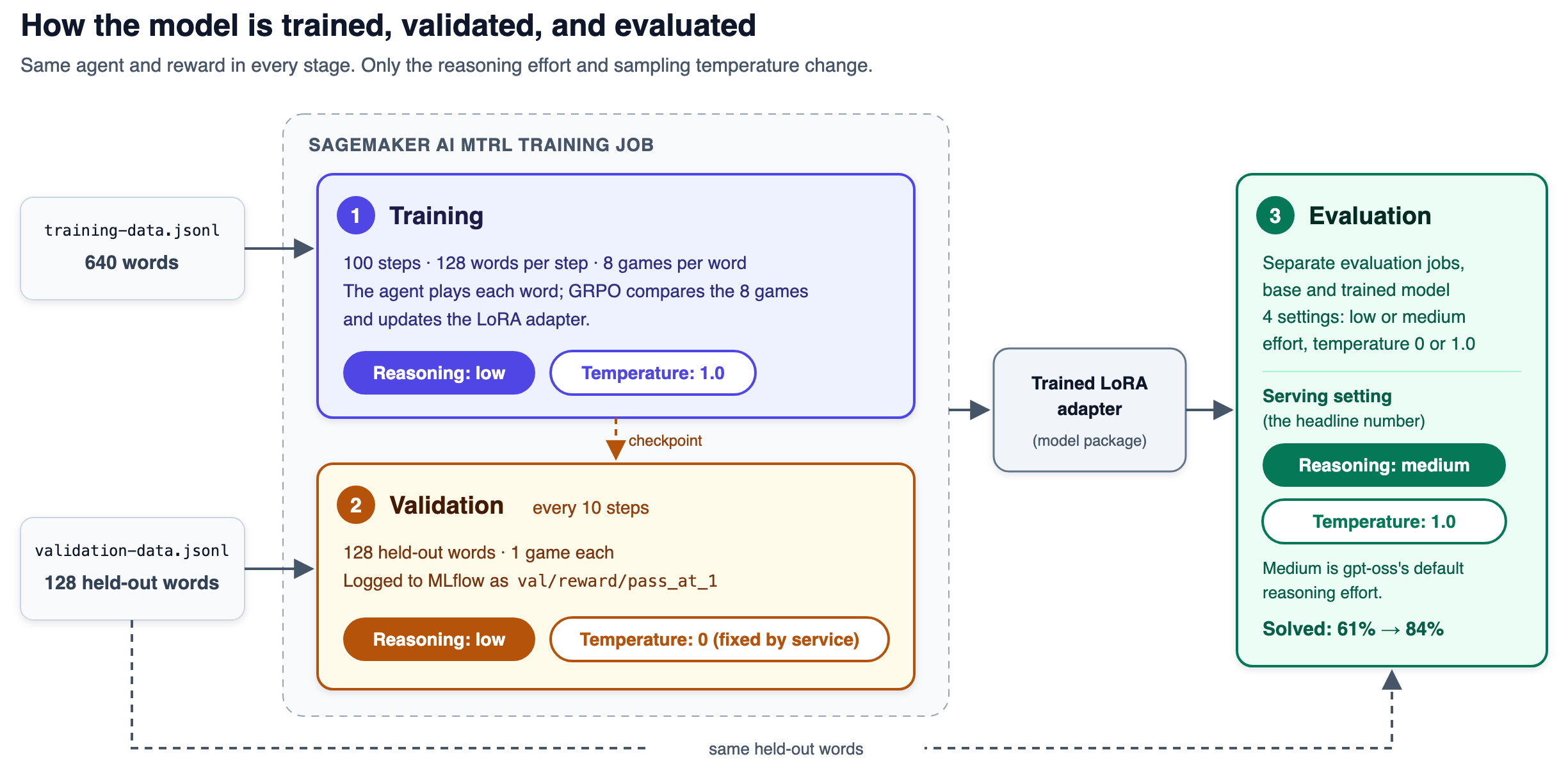
Figure 6: Reasoning effort and sampling temperature at each stage, where the training job fixes validation at temperature 0 and the deployed effort while evaluation jobs let you choose
Each 128-word evaluation took four to seven minutes. Reasoning effort comes from the agent’s environment variables, so to change it you edit REASONING_EFFORT, redeploy, and evaluate. We evaluated both models at low and medium effort and at temperature 0 and 1.0:
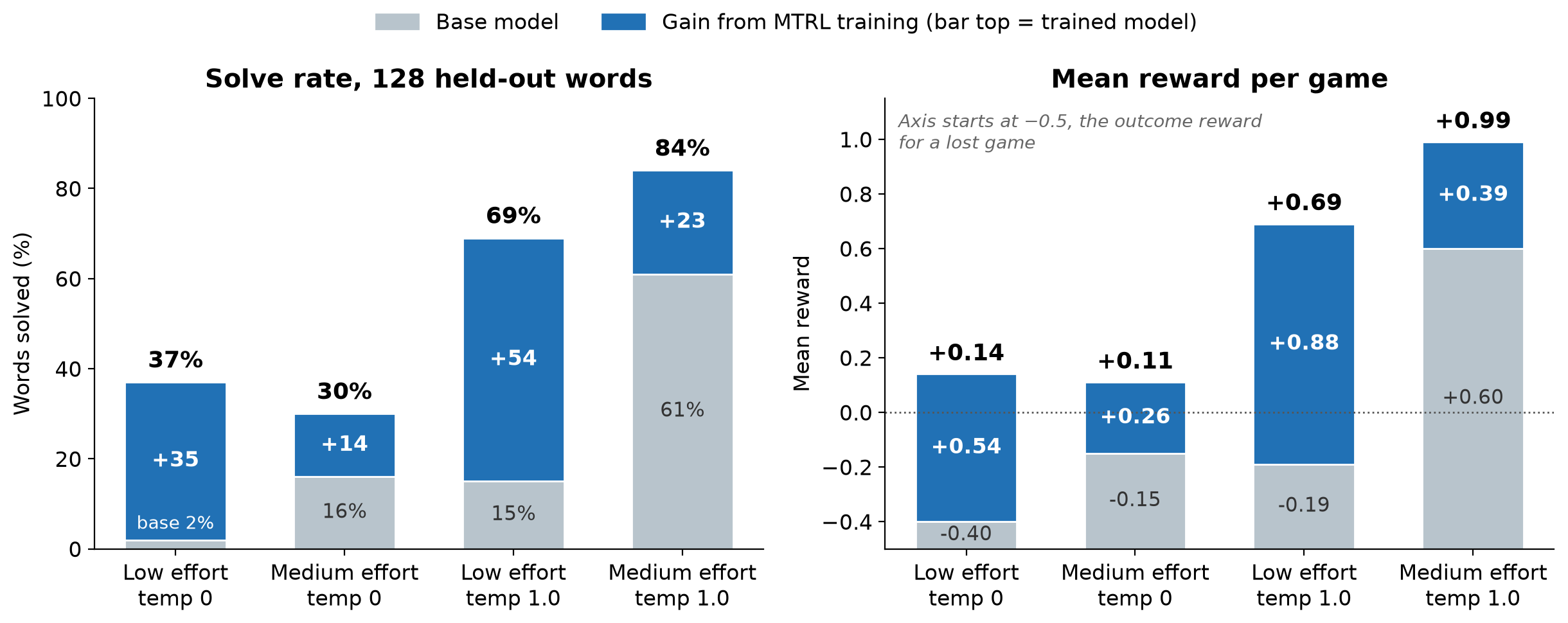
Figure 7: Base model versus trained model under four decoding settings, with solve rate on the left and mean reward per game on the right
The gray segment of each bar is the base model and the blue segment is the gain from training. The low-effort, temperature-0 pair is the training job’s validation at steps 0 and 100. The medium-effort, temperature-1.0 trained result is the mean of two runs (80 and 88 percent).
At temperature 0, both models often end the game without a solve, at either effort. With sampling on, medium effort adds 15 points for the trained model and 46 for the base model. The adapter adds 14–54 points in every setting, so what training taught transfers across settings.
The training job’s own validation curve in MLflow told a different story: it peaked at 48 percent at step 90 and ended at 37 percent, scored at temperature 0. The hyperparameters reference recommends temperature 0 for evaluation because greedy decoding makes curves deterministic and comparable across runs. We report temperature 1.0 because that’s how we serve the model. At medium effort and temperature 1.0, the trained model solves 84 percent of held-out words, up from 61 percent for the base model.
Tip: Evaluate at the settings you will serve at. The training curve says this adapter ends at 37 percent. At serving settings it solves 84 percent. The evaluation jobs that show this cost about $1.20 in tokens and took about an hour.
Step 8: Clean up
Training and evaluation jobs stop billing when they complete, but the AgentCore runtime, its IAM role, the MLflow app, and the S3 objects persist. From the project directory:
# 1. Agent runtime and its execution role. remove all resets the project config;
# the next deploy sees the empty state and tears down the deployed resources.
cd sample-multi-turn-rl-wordle/Wordle
agentcore remove all
agentcore deploy

# 2. MLflow app
aws sagemaker delete-mlflow-app --arn arn:aws:sagemaker:<REGION>:<ACCOUNT>:mlflow-app/<APP_ID>

# 3. Datasets, job output, and evaluation output
aws s3 rm s3://<YOUR_BUCKET>/wordle-mtrl/ --recursive
Because agentcore remove all rewrites the files under agentcore/, run git checkout -- agentcore/ if you want to redeploy later. Deleting the AgentCore-Wordle-default CloudFormation stack removes the same resources and leaves the files alone. The training job role and the model packages are not billed.
Deep dive: Designing the reward
Our reward needed one revision, and the mistake is a common one.
The first design summed the per-guess scoring from the wordle-lora-rl project over the whole game. That scoring works there because each guess is an independent training sample. Summed into one reward per game, it produced two inversions we found only by reading traces:
- A lost game paid positive reward. Six turns of bonuses added up to about +0.49.
- Solving on turn 1 scored below solving on turn 3. A first-guess solve earned +0.99 and a third-guess solve earned +1.61, because the extra turns collected more bonuses.
The fix separates a dominant outcome term from a small, bounded shaping term:
reward = outcome + w * clip(shaping, -1, 1), w = 0.04 if solved, else 0.15The outcome term is set entirely by how the game ended:
| Outcome | Value |
| Solved on guess n | 1.05 + 0.5 * (6 – n) / 5, so 1.55 on guess 1 down to 1.05 on guess 6 |
| Played all six guesses, unsolved | -0.5 |
| Never made a valid guess | -1.5 |
The shaping term is that per-guess scoring, summed over the game:
- Penalties for contradicting a known green, yellow, or gray letter, for repeating a guess, and for words outside the dictionary.
- An entropy bonus for a strong opening word.
- Bonuses for trying new letters and for shrinking the set of remaining possibilities.
The sum is clipped to [-1, 1] and scaled by 0.04 for a solve and 0.15 for a loss, so it separates games with the same outcome but never moves a game into another tier. With typical shaping values:
| Scenario | Reward |
| Solve on guess 1 | +1.550 |
| Solve on guess 3 | +1.375 |
| Solve on guess 6 | +1.069 |
| Lost after six guesses | -0.427 |
| Never made a valid guess | -1.500 |
A faster solve now always beats a slower one, every solve beats every loss, and never playing is the worst outcome. Our first fix used a single weight of 0.15, which let a guess-3 solve with full shaping (+1.45) outscore a guess-2 solve with the minimum (+1.25). Adjacent guess counts are 0.1 apart, so a smaller solve weight of 0.04 removes the overlap, and the worst solve (+1.01) still clears the 1.0 success threshold. Shaping still matters because GRPO learns from reward variance within a group, so two lost games that differ in clue consistency still teach the model something. As the SageMaker AI documentation advises, start with an outcome-based reward, add shaping sparingly, and check the reward on real trajectories.
Deep dive: What went wrong, in the order you will hit it
Each of these cost at least one training run.
- Bearer tokens under concurrency. Minting a token with a fresh botocore session per call starved the credential provider at 32 concurrent rollouts, and caching tokens for an hour returned 403 errors as credentials rotated. The fix is one self-refreshing session, a short cache, and a re-sign on 403.
- A rollout that never reaches the policy model fails the whole job. When every model call in a rollout failed authentication, the service ended the job with “No sampling requests were received.” Returning an error status fails it too, so always return a reward. A game where the model is sampled but never makes a valid guess is fine: it scores -1.5, and the 100-step run had 51 of them in about 105,000 rollouts.
- Tool calls drift into plain text. At too high a learning rate, the model wrote tool calls as text, every rollout got the same floor reward, and the gradient vanished. The agent now recovers guesses from raw text with a small formatting penalty.
- The plateau. Training reward stopped rising after about step 15 and validation stopped improving after about step 30, though at temperature 0 validation understates the model (Step 7). A curriculum that seeds games with prior guesses, or more rollouts per word than the default
group_sizeof 8, is what we would try next.
Conclusion
MTRL on SageMaker AI trains a model on the outcome of a whole episode. That fits agentic tasks, where the right trajectory is unknown and only the result can be scored. We used a single episode-level reward. When intermediate steps can be scored too, MTRL also accepts one reward per turn through the UpdateReward API. In this post, an open-weight 20B model reached an 84 percent solve rate at serving settings, up from 61 percent, for about $339 in training tokens and about $79 in AgentCore runtime usage. The 37 percent the training curve reports is an artifact of how the training job scores validation, so evaluate at the settings you will serve at.
The same pipeline applies to internal procedures, tools, and workflows that public models were never trained on.
To get started, clone the sample repository, follow the preceding steps, and run the smoke test in Step 3 before committing GPU time. For the underlying APIs, see the SageMaker AI MTRL documentation.
About the authors

Daniel Quang
Daniel is a Solutions Architect on the Frontier AI Startups team at AWS, where he helps the world’s largest and most strategic generative AI startups scale their infrastructure on the cloud. He holds a PhD in Computer Science from the University of California, Irvine, with a research focus on machine learning and bioinformatics.

Hadrien Almela
Hadrien is a Senior Frontier AI Account Manager in the AWS Startup team, helping top AI startups build technical integrations and global go-to-market (GTM) partnerships. He has eight years of experience in the startup landscape.

Vinay Bhat
Vinay is the Head of Solutions Architecture for Frontier AI at AWS, where he leads a team of technologists helping foundation model labs and AI-native startups build, train, and scale their models and applications on AWS. He brings more than 20 years of experience building technical teams across AWS, Google Cloud, and high-growth startups.
来源:AWS Machine Learning Blog · aws.amazon.com